Designing AI as a
learning partner
College students are using generative AI to get things done faster, but faster isn't always better when learning is the goal. I worked with a Microsoft team to redesign the Copilot experience in Word Web to support students' thinking, not replace it. The result: Word Board, a Copilot-assisted brainstorming space embedded directly in the document workflow.
Generative AI has fundamentally changed how students learn, or avoid learning.
Students aren't going to stop using AI. The question becomes whether it makes them better thinkers or just faster ones.
The statistics
Our research confirmed what the headlines were reporting, at the scale and specificity needed to design into it.
of US college students use AI in their current academic workflow.
of respondents used genAI at least once in the past week.
students feel confident about how AI actually uses their data.
AI is making students more productive, at the cost of their own thinking.
Generative AI tools have become deeply embedded in academic workflows. But generating finished content on demand bypasses the cognitive struggle that actually leads to learning. The Copilot experience, like other generative AI tools, was optimized for speed, not understanding.
What students were struggling with
Couldn't verify whether outputs were accurate or hallucinated
Felt their ideas were being replaced, not supported
Copilot didn't fit naturally into how students actually write
Word Board lives alongside the word document, giving students a canvas to brainstorm, connect ideas, and use Copilot as a thinking partner, without losing sight of their own work.
Entering Word Board & Adding a Card
Students open Word Board directly from within Word Web. Copilot generates an initial idea card from the document context. Copilot-authored cards are visually distinct from student-authored ones from the very start.
Uploading Files
Students can upload files, PDFs, documents, web links, directly to the Board. Copilot reads the uploaded content and generates idea cards from it, turning source material into brainstorming fuel.
Different Types of Cards
The Board supports multiple card types: text cards (student-authored ideas), link cards (web sources), file cards (uploaded documents), and Copilot cards (AI-generated). Each has a distinct visual treatment so the source of every idea is always clear.
Creating New Connected Cards
Students can manually draw connections between cards to build their own argument structure. Connecting two cards signals a relationship, the student defines what the connection means and how ideas relate.
Creating New Connected Cards with Copilot
Students can ask Copilot to generate a new card connected to an existing one, expanding a single idea into a cluster of related thoughts. Copilot suggests; the student decides which connections to keep.
Regenerating Cards with Copilot
If a Copilot-generated card doesn't quite fit, students can regenerate it. Instead of replacing the original, regeneration spawns a variation alongside it, so nothing is lost and students can compare options.
Generating Document Text from Cards & Tracing Card Origin
When a student is ready to write, they can select cards on the Board and ask Copilot to generate Word document prose from them. The writing is grounded in the student's own ideas, making the output feel earned, not outsourced.
Tracing Copilot Text to Card Origin
Students can click any Copilot-generated sentence in the document and trace it directly back to the board card it came from. This audit trail supports academic integrity and helps students understand exactly how AI contributed.
Connecting & Grouping Cards with Copilot
The relationship is bidirectional. From within the document, students can ask Copilot to generate Board cards from selected text, turning what they've already written into raw material for further brainstorming.
Copilot Reasoning
Every Copilot action on the Board is logged in a prompt history panel, what was asked, what was generated, and when. Students can revisit past prompts to understand how their session evolved and replay any step.
Prompt History
Students can expand any Copilot card to see the reasoning behind it, why Copilot made that connection, what context it drew on. Making AI thinking visible reduces blind trust and helps students critically evaluate each suggestion.
Responsive Screens
Word Board adapts across screen sizes. On smaller screens, the Board collapses into a focused single-column view, and the document/board toggle remains accessible, ensuring the core workflow holds regardless of device.
How did I get here?
We knew we wanted to explore the role of generative AI because it has become deeply embedded in how students learn, research, and write. As graduate students ourselves, we were also interested in understanding how these tools were affecting the academic experience beyond simply making tasks faster.
Understanding how students actually think with AI
We ran four research methods in parallel: a customer feedback NLP analysis (1,679 public Copilot entries), a competitive audit of 6 AI writing products, a 72-response quantitative survey, and 12 semi-structured interviews at 45 minutes each. The breadth was intentional as we wanted to triangulate across what students say, what they do, and where existing tools succeed and fail.
Three themes from 12 interviews & ~600 affinity map sticky notes
Under deadline, students bypass their own thinking entirely and turn to AI to get things done fast, skipping the cognitive effort that leads to learning.
"I have a paper due in three hours. I just need to get something down. I'll think about it later."
Students rely on genAI most when they feel least confident in their own skills, especially for writing. This creates a cycle where AI replaces skill-building rather than scaffolding it.
"I second-guess everything I write. At least when Copilot says it, it sounds like it knows what it's talking about."
Despite heavy AI use, students consistently wanted to preserve their own ideas, voice, and contribution. When the final product no longer felt "theirs," it created real discomfort.
"I want the idea to come from me. AI can help me get it out, but the thought has to be mine."
Quantitative findings
Brainstorming is the #1 use case for genAI
82% of respondents use genAI primarily to brainstorm, before writing a single word. That moment, when students open a blank doc and immediately reach for AI, was the gap we were designing to close.
54% seek AI validation to feel confident in their work
Over half of respondents said they seek AI validation to feel confident about their decisions, not for efficiency, but for reassurance. This drove D-01 (Visibility) and D-03 (User-led Evaluation) as priority requirements.
Public reviews revealed three recurring pain points
NLP analysis of public Copilot feedback confirmed the same tensions at scale, benchmark comparisons, privacy distrust, and unmet expectations, pointing to a product that hadn't yet earned student trust.
Users benchmark Copilot against ChatGPT, Gemini, and others constantly
Users express strong distrust about how Copilot handles their data
Mismatch between what users expect and what Copilot actually delivers
Turning research into design direction
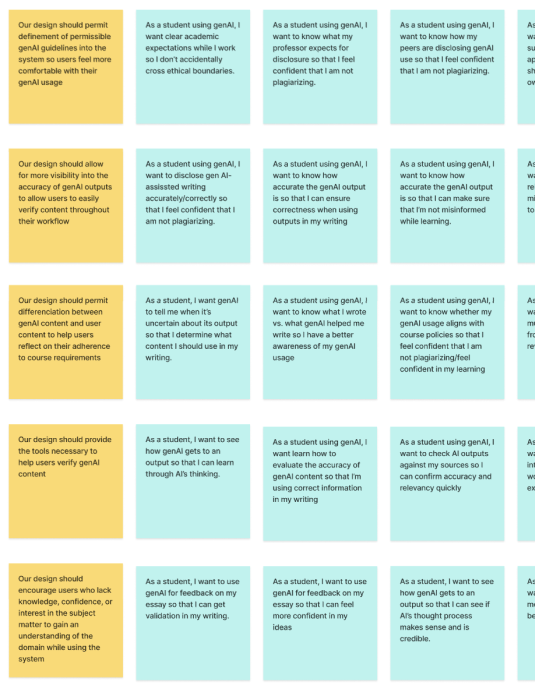
We mapped findings from all four research methods into an affinity map (~600 sticky notes), then identified clusters, translated clusters into user needs, and user needs into four design requirements. Two user groups emerged: The Learner, less confident, high AI dependency risk, and The Expert, confident, uses AI tactically for efficiency.
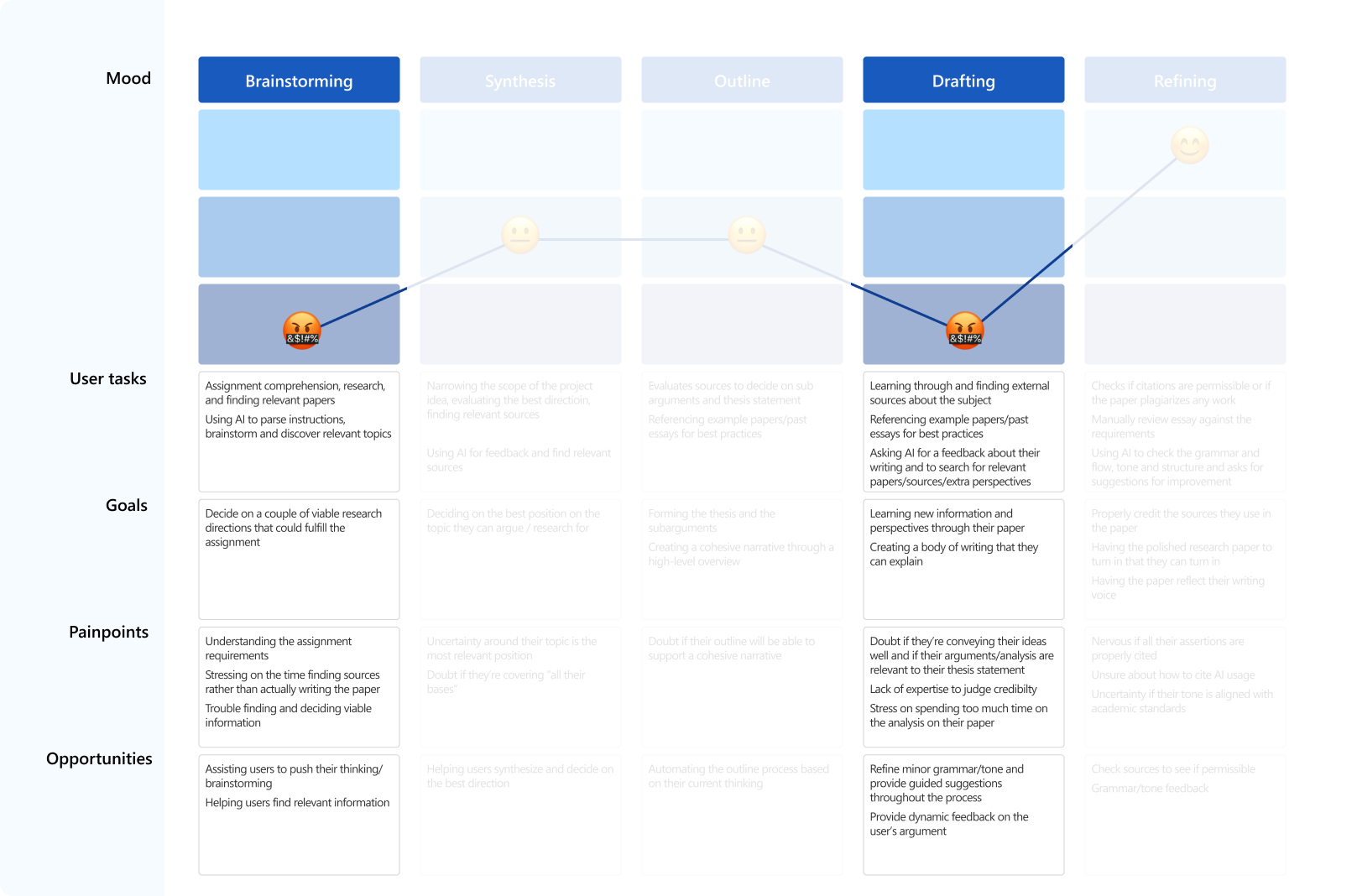
A journey map across five writing phases (Brainstorming, Synthesis, Outline, Drafting, Refining) showed where AI was displacing student cognition rather than supporting it. The brainstorming phase was the biggest gap, students were reaching for AI before they'd even formed an opinion of their own.
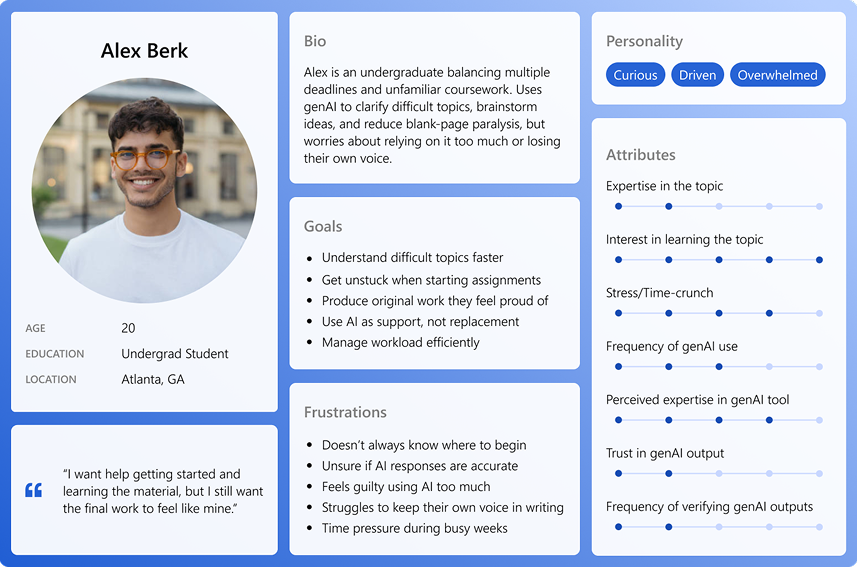
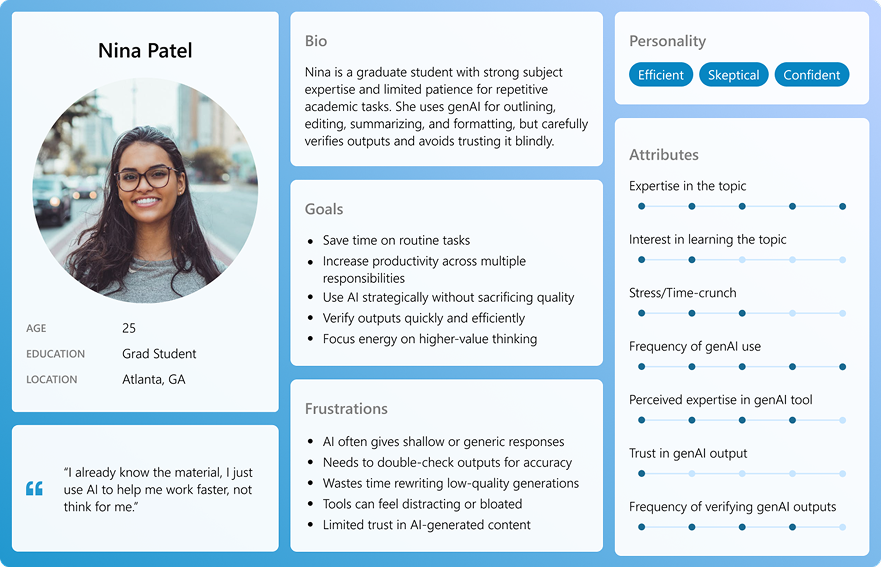
We designed primarily for The Expert, a student with genuine subject-matter knowledge who risks having their expertise displaced by AI rather than supported by it.
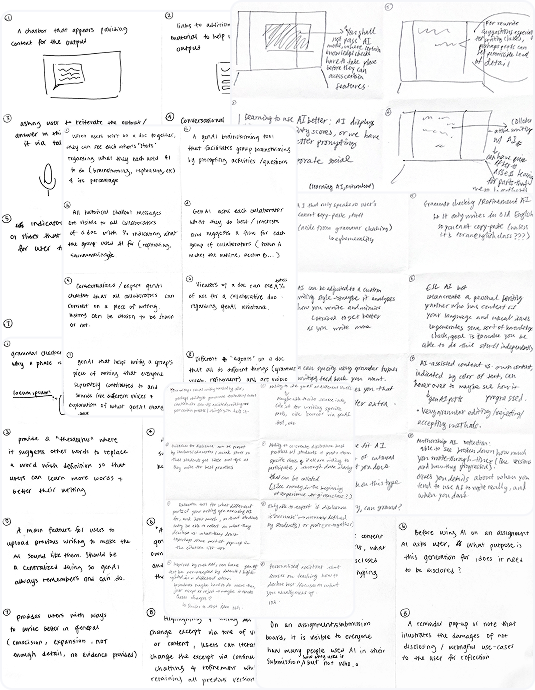
From 123 ideas to 4 concepts
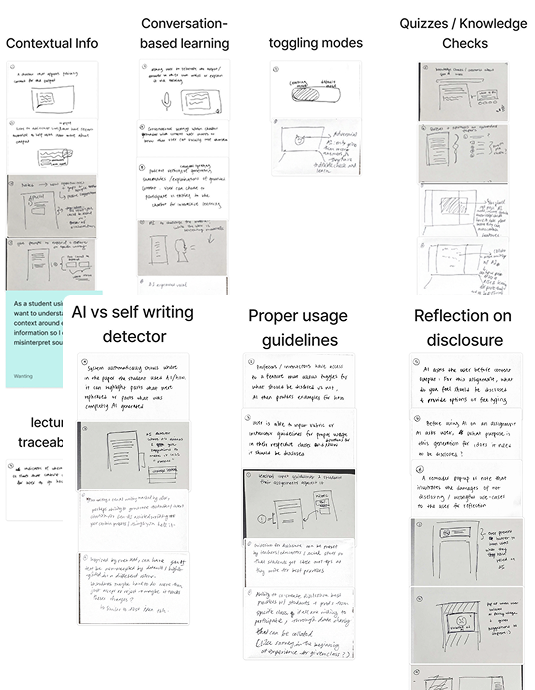
With the brainstorming gap clearly defined, we ran several ideation sessions using Crazy 8s, SCAMPER, and user story exercises to generate a wide range of directions. We then clustered ideas around our four design requirements and pressure-tested them against edge cases before narrowing to four concepts worth developing.
4 concepts that best addressed the problem space
Each concept addressed the core tension, supporting student thinking without replacing it, but approached it from a different angle.
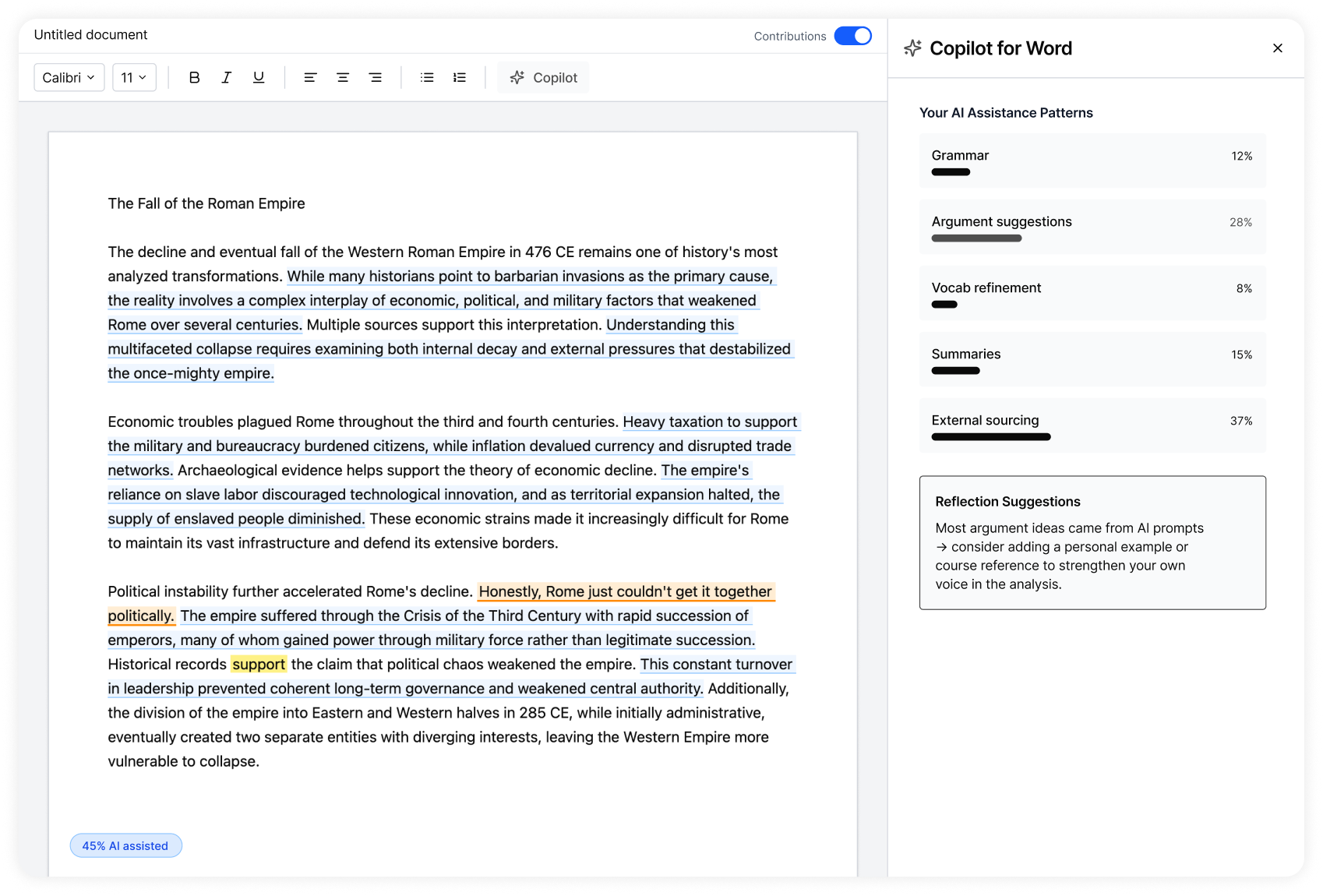
Shows AI contributions to the paper broken down by category, helping students reflect on their reliance on genAI and maintain ownership of their writing process.
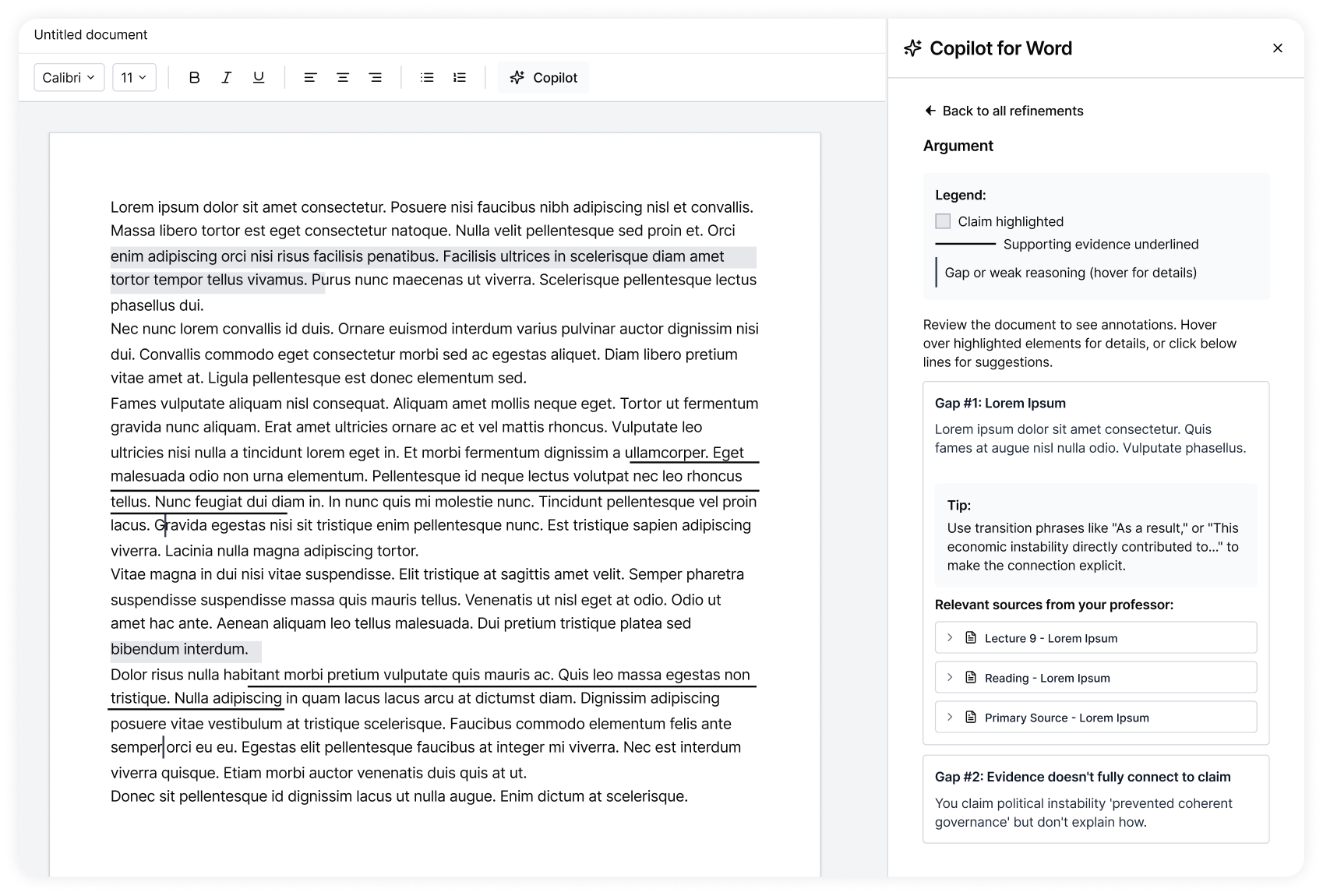
Highlights claims, evidence, and reasoning in the document, as well as weak points, helping students strengthen their arguments through rubric-aligned feedback and source discovery.
A consolidated space of instructor and student-uploaded sources and AI guidelines that a student can access at any point in their writing process, grounding AI use in course-specific context.
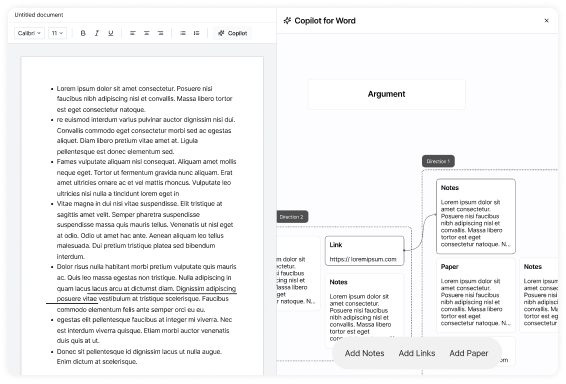
A visual workspace where students turn messy ideas into structured arguments by connecting thoughts, sources, and emerging themes, before drafting. Keeps Copilot in a supporting, not directing, role.
Concept testing results · Students + 18 Microsoft designers
The Brainstorming Map received the most interest, students said it aligned with how they actually brainstorm. Building on the strength of the Copilot ecosystem, users appreciated that it created a consolidated place for scattered thoughts, notes, and sources, making their workflow more streamlined. They also wanted the ability to inquire further into AI-generated content, which directly shaped the Reasoning and Prompt History features.
Other concepts received positive feedback but required significant professor involvement to implement, and, most importantly, risked displacing instructor expertise rather than complementing it. The board was the only concept that kept the intellectual work squarely with the student.
Testing with real students under real conditions
A usability study with 6 college students (60 minutes, remote) used the Single Ease Question scale (1 = Very Difficult · 7 = Very Easy) to score each task. Core Board interactions scored exceptionally well. Opening the board and regenerating cards revealed meaningful friction, and became the focus of the next iteration. Notably, the low scores on early interactions didn't surface in our Microsoft design crit, it took real students, under task pressure, to find them.
Board ↔ Doc relationship
Students immediately understood how cards connected to document text and back.
AI vs. manual distinction
Visual card differences between Copilot and student content were recognized immediately.
Reasoning discoverability
The reasoning dropdown was rarely found, users expected it near the prompt itself, not in a panel.
A version of Copilot that makes students better thinkers, not faster typists.
Word Board was validated through rounds of expert critique and usability testing before being presented to the Microsoft Copilot product team. The Board-to-Document tracing and visual AI differentiation were the features most likely to carry forward in future explorations.
Students who interacted with Word Board described feeling more confident in their work, not because AI did it for them, but because it helped them trust their own process. The most important finding wasn't a metric, it was that the experience preserved the feeling of authorship.